Poseloop Motion Control
Plan Every Move for Your Character Animation
Explore motion references alongside your character image. Use the workspace to preview your files, choose an orientation, and describe the scene you have in mind. Save the brief on this device so you can return to your creative direction.
Introduce Poseloop
A visual workspace for your character image, motion reference, orientation preferences, and scene notes.
Pair a character image with a reference video. Preview both locally, choose your orientation, and save scene notes in your brief.
Pair a character image with a reference video. Preview both locally, choose your orientation, and save scene notes in your brief.
Ideal for predictable motion outcomes, long one-shot actions, and precise hand and body control.
Motion references for your creative brief
Review your character image alongside your motion reference.
One character image + one motion clip
Choose local image and video files to keep your creative direction together.
Built for control and predictability
Keep your image, motion reference, and scene notes together.
How to Use Poseloop
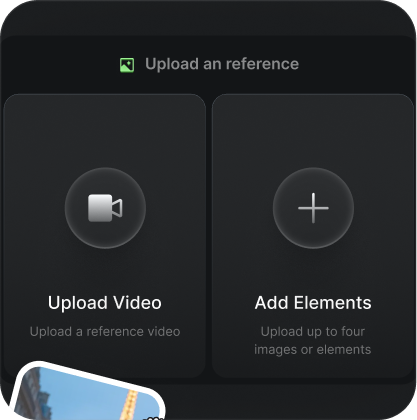
Upload a motion reference video and character image.
Upload a motion reference video and character image.
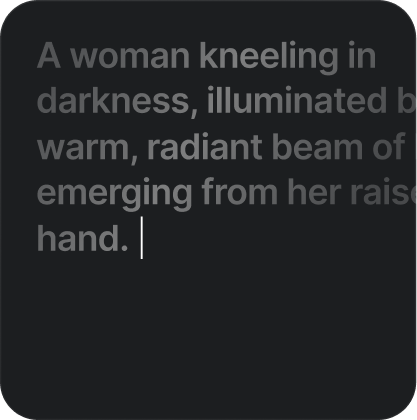
Enter a prompt to control background and scene details
Enter a prompt to control background and scene details
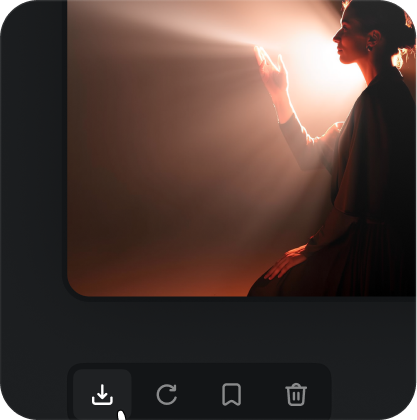
Save your motion brief with Poseloop
Save your motion brief with Poseloop
Poseloop Use Cases
Character Animation & Illustration
Collect movement references for illustrated characters, mascots, and concept art in your motion brief.
Product & Brand Videos
Plan gesture references for brand characters, product concepts, and visual storytelling briefs.
Storyboarding & Pre-Visualization
Collect character images and performance references early in your creative planning process.
Social Media Content Creation
Plan short-form stories by pairing a character image with your own movement reference.
Key Features of Poseloop
Motion Reference Planning
Pair a character image with a reference video. Preview both locally, choose your orientation, and save scene notes in your brief.
Body Motion References
Pair a character image with a reference video. Preview both locally, choose your orientation, and save scene notes in your brief.
Hand and Gesture Notes
Pair a character image with a reference video. Preview both locally, choose your orientation, and save scene notes in your brief.
Character Orientation Preferences
Pair a character image with a reference video. Preview both locally, choose your orientation, and save scene notes in your brief.
Audio Preference Settings
Pair a character image with a reference video. Preview both locally, choose your orientation, and save scene notes in your brief.
Scene Description Notes
Pair a character image with a reference video. Preview both locally, choose your orientation, and save scene notes in your brief.
Advantages of Poseloop
Built for predictable motion outcomes, identity stability, and faster iteration.
Clear motion references for a creative brief
Keep a character image beside your reference
Preview a reference clip up to 30 seconds
Record your action and expression notes
Keep your creative direction in one workspace
Keep motion references and scene preferences together
Creative Directions to Explore
Explore reference ideas for character animation, brand concepts, storyboarding, social media, and creative research.
Pair a character image with a reference video. Preview both locally, choose your orientation, and save scene notes in your brief.
Pair a character image with a reference video. Preview both locally, choose your orientation, and save scene notes in your brief.

Pair a character image with a reference video. Preview both locally, choose your orientation, and save scene notes in your brief.

Pair a character image with a reference video. Preview both locally, choose your orientation, and save scene notes in your brief.

Pair a character image with a reference video. Preview both locally, choose your orientation, and save scene notes in your brief.

Pair a character image with a reference video. Preview both locally, choose your orientation, and save scene notes in your brief.

Choose Your Poseloop Credit Pack
Choose a credit pack preference for your motion brief. Preview a character image and a motion reference, choose your orientation, and add scene notes. Your files stay in the browser while you prepare your creative direction.
Starter
Basic
Plus
Professional
Choose a pack • Save your creative preferences
Your plan choice is saved in this browser alongside your motion brief.
FAQs about Poseloop
Preview local media and save your scene preferences.
Choose a JPG or PNG image and an MP4 or MOV reference video. You can preview both locally before saving your brief.
Your image and video stay in your browser. They are not sent to an image or video processing service.
Yes. Select Image or Video in the workspace to record your preferred orientation in the brief.
Yes. Use the Prompt field to describe lighting, atmosphere, background, and visual style.
Yes. The Keep Original Sound switch records your preference in the saved brief.
Choose a plan on the pricing page. Your selection is saved locally and the workspace opens with that preference.
The displayed packs are one-time credit pack options. Selecting a pack saves your preference without starting a subscription.
Scene settings and plan preferences are saved in this browser on this device. Selected media files are only previewed in the current tab.
Poseloop is independent and is not affiliated with Kling or Kuaishou.